

Round ⬜
Note
A transparent, click-through overlay that draws rounded corners on every connected monitor. Native on macOS and Windows; Linux builds but is untested.
One tray icon. One overlay per screen. No window manager plugins.






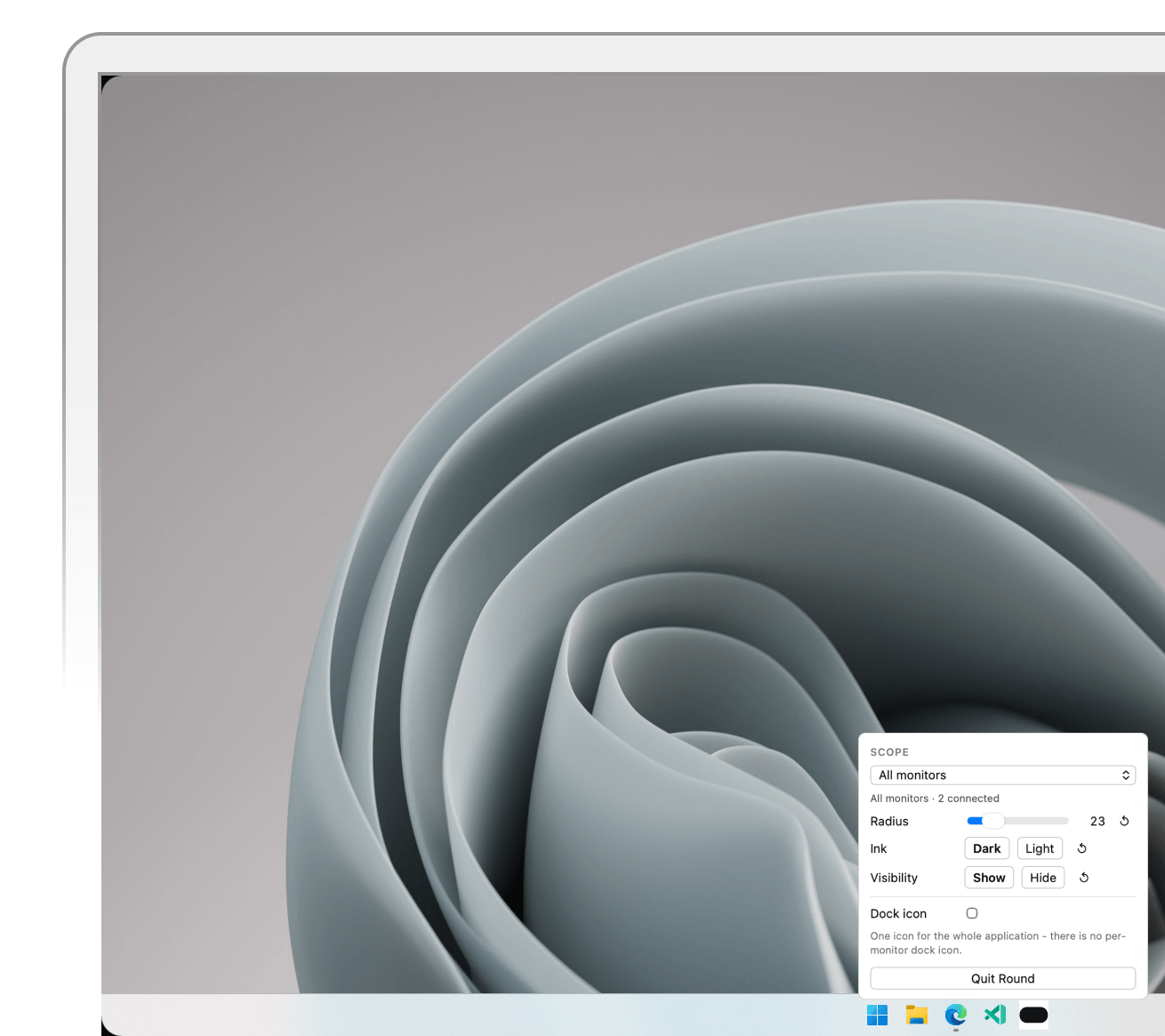

Round is a Tauri 2 tray application. It spawns one borderless, transparent
webview per monitor, sized to that monitor's bounds, draws four rounded corners
inside it with Solid, and is controlled from a panel that opens under the tray
icon. Size, ink, and visibility are persisted through tauri-plugin-store, so
the desktop looks the same after a reboot.
Each window is lifted above the OS chrome, because a corner that the menu bar or the taskbar draws over is not a corner:
- macOS sets
NSStatusWindowLevel, the collection behaviourcanJoinAllSpaces | stationary | ignoresCycle | fullScreenAuxiliary, andsetIgnoresMouseEvents:YES. Transparency requiresmacOSPrivateApi. - Windows calls
SetWindowPos(HWND_TOPMOST, ..., SWP_NOACTIVATE)and addsWS_EX_TOOLWINDOW | WS_EX_NOACTIVATE | WS_EX_TRANSPARENTon top of Tauri'sWS_EX_LAYERED, then switches off Windows 11's own corner rounding (DWMWCP_DONOTROUND) so the drawn corners are the only ones. - Linux falls back to
always_on_top+skip_taskbar; struts and panels from the desktop environment may still draw over the corners.
Download the macOS .dmg or the Windows installer from
releases and launch it. Round
lives in the tray: the icon opens its controls, and there is no dock window and
no main window.
Important
The macOS bundle is ad-hoc signed (signingIdentity: "-") and not notarised,
because hardened-runtime signing without a Developer ID is rejected on Apple
Silicon. Gatekeeper asks you to confirm the first launch.
git clone https://github.com/PlayForm/Round.git
cd Round
pnpm install
pnpm run Build # vite -> Package/Web/Target
cargo build --release
./Target/release/round
To produce the installers instead of the bare binary:
pnpm tauri buildThe same engine is published as a crate, so an overlay can be added to another Tauri application without copying this one:
cargo add prounduse pround::{
Overlay::{Layer::Trait::Trait as _, Platform::Struct as Platform},
Screen::Of as ScreenOf,
Window::Chrome,
};
// One overlay per monitor, then lift it above the OS chrome.
let Screen = ScreenOf::Fn(monitor, index);
let Window = Chrome::Fn(tauri::WebviewWindowBuilder::new(app, &Screen.Label, tauri::WebviewUrl::App("index.html".into())), "")
.inner_size(Screen.Width.into(), Screen.Height.into())
.position(Screen.X.into(), Screen.Y.into())
.build()?;
Platform::Art(&Window); // platform-correct lift, no cfg at the call siteThe crate ships the library target and the round binary. The binary embeds the
webview build (Package/Web/Target) at compile time, so it is built from a
checkout where pnpm run Build has run - a cargo install pround without that
directory has no corners to draw and the build says so.
Note
The published pround 0.0.1 is a one-version name reservation. The library
described here ships with 0.0.9, which supersedes it; until that version is
published, cargo add pround resolves the empty reservation.
The tray icon carries no native menu. Clicking it opens a panel under the icon - a real window, drawn by the same webview stack as the overlays and used as a menu: it hugs its content and never appears in the taskbar or the dock.
While the panel is open, a transparent backdrop window covers every monitor's work area, one level under the panel. Clicking it is what closes the panel: the click is delivered to a window of Round's own, so dismissal is a fact rather than a guess about why the keyboard moved. The backdrop stops at the work area, so the tray icon stays clickable and a click on it still toggles the panel closed.
- All monitors - one slider for the default corner radius (23px on a fresh install). Moving it drops the per-monitor overrides, because "all monitors" is what you meant.
- A row per monitor - that monitor's radius, read while you drag it, and a ↺ that hands the monitor back to the default.
- Appearance - Dark or Light: draw the corners in black or white.
- Overlay - Show or Hide every overlay at once.
- Dock icon - macOS only; unticking it hides the dock icon through
NSApplicationActivationPolicy.Accessory. - Quit Round - quit.
Each control is one Tauri command on pround::Menu::Command - state,
set_size, set_mode, set_hidden, set_dock, reset, quit - and each
returns the state the panel should now render, so the panel never keeps a second
copy of the truth. The function lives in the leaf named after it
(Menu::Command::Size::Size) and pins the name the webview invokes with
#[tauri::command(rename = "set_size")], so the tree can be PascalCase while
the wire stays snake_case. Settings remains the only place the values live.
The one command that is not a control is dismiss, which the backdrop's own
document invokes on a pointer-down: it hides the panel and the backdrop
together, and is idempotent.
Crate/Round- the Rust crate, published to crates.io aspround.Source/Library.rsis the crate root (the overlay engine) andSource/Main.rsis theroundbinary. Each domain is its own PascalCase directory -Backdrop,Bounds,Menu,Message,Mode,Overlay,Screen,Settings,Tray,Visibility,Window- and the tree is the API: a leaf exports one item named by its kind (Struct,Enum,Fn,Trait,Const) and the path says what it is for, soMenu::Place::Fnis the one function that places the panel. Amod.rsdeclares its children and nothing else, and nothing is re-exported anywhere.Package/Web- the webview package: Solid 1.9 + Vite 8 + Tailwind 3, built by@playform/build's tsconfig base intoPackage/Web/Target. The crate embeds that directory at compile time; it is never copied into the crate.Documentation- the guides (Architecture.md,Releasing.md, anIndex.mdmap) and the architecture graphs (Knowledge.dot,Knowledge.svg).Crate/Maintain- the release CLI (Maintain). One writer for the version across every manifest, the local mirror of the CI gates, the bundle build, and the whole ceremony (Maintain release 0.0.14 --publish) in one command.publish = false: it is a tool for this repository, not a crate.Release.sh- the local signed macOS release; the tag it offers comes fromMaintain version, so a drifted tree cannot start one..github/workflows-Check,Build,Publish,Auto,Dependabot,GitHub.
- Architecture - the module map, the startup sequence, the menu window → settings → webview event flow, the webview contract, and where to change what.
- Releasing - one version in
Cargo.toml, theMaintainCLI that writes it everywhere, theRound/v*tag, the opt-in crates.io publish, and how to test a publish without burning a version. - Documentation index - the map of the set.
Prerequisites: the Rust nightly toolchain from rust-toolchain.toml
(rustfmt + clippy included), Node ≥ 22.22.3, and pnpm 12 (pinned in
package.json).
pnpm install   # workspace install, Package/Web included
pnpm run dev   # vite dev server on :1420 (turbo run dev)
pnpm tauri dev # the app against the dev server
pnpm run Build # production webview build (turbo run Build)
cargo build    # debug binary at Target/debug/round
cargo test     # the control-flow tests: IPC -> command -> store

# the release CLI (Crate/Maintain)
cargo install --path Crate/Maintain # once, gives you `Maintain`
pnpm run Version                    # Maintain version: the number + drift check
pnpm run Check                      # Maintain check: fmt, clippy -D warnings, check
Cargo.lock is deliberately untracked: the crate publishes to crates.io and
every consumer resolves its own graph. Target/ and Package/Web/Target/ are
build output and are ignored.
Every link in the documentation and in the source comments is checked by
lychee, configured in .lychee.toml:
lychee --config .lychee.toml 'README.md' 'CHANGELOG.md' 'Documentation/*.md' \
	'Crate/**/*.rs' 'Package/Web/Source/**/*.ts' 'Package/Web/Source/**/*.tsx'
scheme includes file on purpose: a relative link between documents is the one
kind this repository can break on its own - a renamed file leaves a dead link that
no external check would ever see.
A debug build (pnpm tauri dev, or tauri build --debug) writes one line per
event to stderr and to
~/Library/Application Support/app.roundedcorners.binary/trace.log:
click set_mode label=Some("Monitor26344") mode=light
changed   ink=Struct { Default: Dark, Monitor: {"Monitor26344": Light} }
persisted {"ink":{"default":"dark","monitor":{"Monitor26344":"light"}}}
broadcast -> Monitor26344 radius=23 ink=Light visible=Shown
broadcast -> Monitor22763 radius=23 ink=Dark  visible=Shown
That is the whole path in order - what arrived, what changed, what was stored,
what each window was told - so a break names its stage. intercepted dismiss
appears instead of click when a click lands on the scrim rather than the
panel. All of it is behind cfg!(debug_assertions) in the Trace! macro,
format strings included, so a release build carries none of it.
Check.yml- on every push and pull request toCurrent: builds the webview package once, shares it as an artifact, then runscargo fmt --check,cargo clippy -D warnings,cargo check, and a packaging guard that asserts the crate's own files (Source/,icons/,tauri.conf.json) are in the published tarball.Build.yml- on aRound/v*tag: creates the release once, then bundles on macOS (arm64 and x86_64), Linux, and Windows, checksums every artifact, attaches them to the release, and fails if a platform is missing.Publish.yml- on aRound/v*tag: the packaging guard and a library consumer probe run against the crate. Publishing to crates.io is an explicit opt-in (workflow_dispatchwithpublish_crates=true), so a tag push can never burn an immutable version; it authenticates through crates.io trusted publishing (OIDC, no stored registry token) and skips a version that is already live.Auto.yml- a daily heartbeat that touches.github/Update.md, nothing else.Dependabot.yml- daily updates for npm, cargo, and GitHub Actions, with Tailwind pinned to 3.x.
See
CHANGELOG.md
for a history of changes to this app.
CC0-1.0 - public domain dedication.